
Technical SEO for Personal Injury Law Firm Websites: The 2026 Guide
Technical SEO for personal injury law firm websites is the layer of your website’s foundation that decides whether Googlebot can crawl your practice area pages, whether Google’s index actually stores them, whether the rendering pipeline reads your JavaScript, whether your Core Web Vitals clear the ranking threshold, and whether your Attorney schema binds your bio to the personal injury attorney entity in Google’s knowledge graph. It sits underneath every content decision, every backlink, every Google Business Profile edit. If Phase 1 is broken, none of the rest earns you signed cases.
I run this diagnostic on every firm I audit. The pattern is consistent: mid-size personal injury practices with respectable content programs and decent backlinks are losing organic case acquisition to competitors with weaker content and weaker links, because Phase 1 is quietly bleeding out. Crawl budget wasted on attorney tag archives. City pages stuck in Discovered But Not Indexed. Intake forms with an INP so slow that mobile users bounce before submit. Attorney schema missing sameAs binding. Review schema deployed in a state where the bar rule quietly makes it exposure.
This guide walks Phase 1 the way I walk it in a client diagnostic. It names every canonical part of technical SEO in the order I audit them, ties every recommendation to a signed case impact, and overlays the attorney advertising rule constraints that generalist SEO guides skip. Every reference is a primary source: Google patents, Google Search Central documentation, web.dev, Schema.org, W3C, the ABA Model Rules, and my own two 2026 papers on personal injury law firm schema deployment. Zero competitor citations. Read it end to end, or jump to the section that matches the pattern you already suspect.
Table of contents
- Where Technical SEO Sits in the Personal Injury Search Marketing Stack
- The PI Organic Authority Engine Phase 1: Technical Stability as the Personal Injury Case Acquisition Foundation
- Crawlability for Personal Injury Law Firm Websites
- Indexation Coverage on Personal Injury Law Firm Sites
- Rendering and JavaScript SEO for Personal Injury Law Firm Sites
- Core Web Vitals Targets for Personal Injury Law Firm Websites
- Site Architecture and URL Structure for Personal Injury Law Firm Websites
- Structured Data for Personal Injury Law Firm Websites, with Attorney Advertising Rule Overlay
- Mobile First Indexing and the Personal Injury Intake Form INP
- HTTPS, Security Headers, and Personal Injury Attorney Websites
- Duplicate Content and Canonical Strategy for Personal Injury City Pages
- Log File Analysis for Personal Injury Law Firm Sites
- Hreflang and Bilingual Personal Injury Law Firm Sites
- E-E-A-T Technical Signals for Personal Injury Attorney Bio Pages
- Common Technical SEO Diagnostic Patterns Across Personal Injury Firms
- Working with a Personal Injury Technical SEO Specialist vs a Generalist Legal Marketing Agency
- Frequently Asked Questions
- Closely Related Personal Injury SEO Topics
- References
Where Technical SEO Sits in the Personal Injury Search Marketing Stack
Technical SEO is a subdiscipline of Search Engine Optimization, which sits inside Search Marketing, which sits inside Digital Marketing. Personal injury law firms hire search marketing help across all three, so knowing where each hire fits saves you from paying a technical SEO retainer for content strategy work, or paying a content strategist to fix a rendering bug.
The hypernymic chain I hand every managing partner on our first call runs from Digital Marketing at the top down to Personal Injury Technical SEO at the specialized bottom. The chain below is the taxonomy the search industry has settled on. The PI Organic Authority Engine framework layers on top of it, never replacing it.
Discipline branch
Vertical branch
The five siblings of Technical SEO inside the SEO parent class matter for the same reason. If you know that On Page SEO, Off Page SEO, Local SEO, Content SEO, and Generative Engine Optimization are the co hyponyms of the discipline you are considering hiring for, you can ask a vendor which of those five they cover and which they hand off. Most personal injury SEO agencies quietly cover all five badly. A specialist covers Technical SEO deeply and coordinates with content and off page separately.
The mechanical parts of Technical SEO, the meronyms, are the levers a specialist actually controls. Crawl request patterns, HTTP status codes, HTTP headers, URL parameters, the sitemap protocol, the robots protocol, the Document Object Model, the rendering path, the critical rendering path, HTML head elements, server response time, compression, caching layers, HTTP/2 and HTTP/3, image formats, font loading strategy, JavaScript execution budget, CSS delivery strategy, the internal link graph, anchor text patterns, and breadcrumb structure. Every one of these is a specific thing that either helps Googlebot or slows it down.
“I tell every firm on our first strategy call that if their marketing director cannot name three of these ten meronyms, they are paying a generalist for specialist work,” I said to a Houston firm last month before opening their Search Console.
Situating the discipline this way also situates the article. Nothing that follows here is content strategy. Nothing here is backlink acquisition. Nothing here is Google Business Profile optimization. This is Phase 1.
The PI Organic Authority Engine Phase 1: Technical Stability as the Personal Injury Case Acquisition Foundation
The PI Organic Authority Engine (PIOAE) is the four pillar system I built for personal injury organic case acquisition. Phase 1 is Technical Stability. Phase 2 is Intent Capture. Phase 3 is Authority Reinforcement. Phase 4 is Case Acquisition Optimization. Technical SEO lives entirely inside Phase 1, and Phase 1 is the floor everything else stands on.
The wheel below highlights Phase 1 as the focus of this guide. Phase 2, 3, and 4 sit around it because they cannot function without a stable technical base.
- Phase 1: Technical StabilityCrawlability, indexation, rendering, Core Web Vitals, schema. This guide.
- Phase 2: Intent CapturePractice area structure, city page silos, search intent mapping.
- Phase 3: Authority ReinforcementInternal linking, entity signals, backlink direction, E-E-A-T.
- Phase 4: Case Acquisition OptimizationConversion paths, intake flow, CTAs, lead quality.
Every technical SEO decision in this guide ties back to Phase 1 and impacts signed case acquisition through Phases 2, 3, and 4.
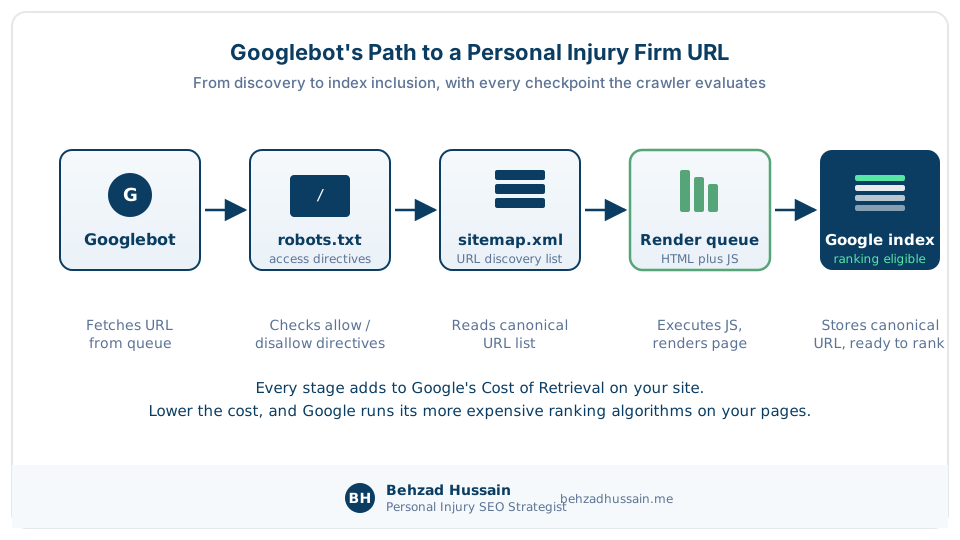
I frame Phase 1 the way the topical authority literature frames it. Every technical decision is a lever that either lowers or raises the search engine’s Cost of Retrieval on your site. Lower the cost, and Google runs its more expensive ranking algorithms on your documents. Raise the cost through slow servers, JavaScript rendering failures, index bloat, or duplicate templates, and Google deprioritizes you during core updates because your site is expensive to process.
“In personal injury SEO, ranking without signed cases is a vanity metric, and ranking-first, cases-later technical work is the fastest way to get to a vanity metric,” I tell every firm before I quote a retainer.
Firms that want the full four pillar engagement (technical, intent, authority, case acquisition) work with me inside the PI Authority Growth System retainer. Firms that want to start with a diagnostic on Phase 1 alone start with the entry offer.
Crawlability for Personal Injury Law Firm Websites
Crawlability is the ability of Googlebot and other retrieval engines to discover, access, and fetch the URLs on your personal injury firm site. If the crawler cannot reach a page, indexing and ranking are irrelevant. Crawlability is the first thing I check.
How much of Google’s crawl budget does a typical personal injury firm site waste on low-value URLs? On the mid-size PI firm sites I audit, between 30 and 60 percent of Googlebot’s daily requests hit attorney tag archives, date-based blog archives, filter parameter combinations, and internal search result pages that add nothing to case acquisition, which means every practice area page you actually want ranked is getting a fraction of the crawler attention it should.
Google’s 2024 patent application, Detecting Signal Exploitation from Consistent Ranking Patterns, US Patent Application 2026/0023790 A1, describes how the search system organizes information before a search to enable fast and accurate responses to queries, with crawling and indexing spending finite resources to keep the index current. That finite resource is the crawl budget your site is competing for. Waste it on attorney tag archives, and your Miami premises liability page gets indexed slower.

The diagram below traces Googlebot from the moment it decides to crawl your firm’s URL through the render queue and into the index.
Robots.txt Configuration for Personal Injury Law Firm Sites
The robots.txt file at your firm’s root domain is the first thing Googlebot fetches on every crawl. Google Search Central’s introduction to robots.txt is the definitive protocol reference, and the mistake I see most often on personal injury firm sites is blocking the wrong directory.
Before you touch the file, read the one sentence that defines its job. I highlighted it on Google’s own documentation page below.

Never block your CSS or JavaScript files. Google needs them to render the page. If you block them, Googlebot cannot see how the page actually looks, and mobile first indexing then treats your firm site as an incomplete document.
Block the surfaces that add zero to case acquisition. Staging subdomains. Internal search result pages. Admin URLs. Preview URLs from your CMS. Filter parameter combinations that generate infinite thin URLs.
A sample robots.txt for a mid-size PI firm might look like this:
User-agent: *
Disallow: /wp-admin/
Disallow: /?s=
Disallow: /search/
Disallow: /*?filter=
Disallow: /staging/
Allow: /wp-admin/admin-ajax.php

Sitemap: https://yourfirm.com/sitemap.xml
That is the shape. The specifics depend on your CMS and your URL patterns. I check every robots.txt against Google Search Console’s URL Inspection tool to confirm the crawler is reading it the way you intended.
XML Sitemap Strategy for Personal Injury Practice Area and City Pages
Your XML sitemap enumerates the canonical URLs on your firm site that you want Google to index. Google Search Central’s overview of sitemaps sets the format standard, and personal injury firms consistently under-invest in sitemap discipline.
Submit a single sitemap.xml or a sitemap index for firms with more than 500 URLs. Include only URLs that return a 200 status, are canonical to themselves, and are indexable. Do not include noindexed URLs, redirected URLs, or 404s. Google reads a sitemap that includes non-indexable URLs as low-quality signal.
For a multi-office regional firm, I typically split the sitemap into practice area, city, attorney bio, blog, and other segments. Each segment file is easier to audit than a monolithic sitemap.
Update the sitemap’s lastmod when the underlying page’s substantive content changes, not on every automated header update. Google mostly ignores lastmod as a ranking signal, but a sitemap that lies about freshness is a low-quality signal you do not want to send.
The mechanism behind that advice is documented. Google’s patent, Scheduler for Search Engine Crawler, US Patent 8,042,112 B1, describes how the crawler scores every URL by its content change frequency and schedules re-crawl from that score. Inflate lastmod on unchanged pages and you teach the scheduler your freshness signals cannot be trusted; keep it honest and your genuinely updated practice area pages earn faster re-crawl.
Crawl Budget Waste Patterns Specific to Personal Injury Law Firm Websites
Personal injury firm sites waste crawl budget in the same three ways almost every time. The table below lists the three crawl budget waste patterns I see on most personal injury firm sites, with the reason each pattern happens and the fix I recommend.
| Waste pattern | Why it happens on PI firm sites | How to fix |
|---|---|---|
| Attorney tag archive pages | WordPress and legacy CMS builds auto-generate a URL for every attorney tagged in blog content | Add noindex plus robots.txt disallow; consolidate to attorney bio pages |
| Date-based blog archives | Standard blog theme behavior; every day, month, year gets an archive URL | Noindex all date-based archives; keep only category and tag pages that add value |
| Filter parameter combinations | Case type filters, city filters, attorney filters on case result pages generate combinatorial thin URLs | Canonicalize to unfiltered parent; block filter parameter URLs in robots.txt |
I had a multi-office firm in Texas come to me last year with 47,000 URLs in their sitemap and 4,200 actually indexed. The rest were filter combinations. We killed 42,000 of them, and Discovered But Not Indexed on their real city pages dropped by 60 percent in six weeks.
Indexation Coverage on Personal Injury Law Firm Sites
Indexation coverage is the set of URLs from your firm site that Google has actually stored in its search index. Crawlability determines whether Google can reach a page; indexation determines whether Google decides to keep it.
How many pages should a personal injury law firm website have? The answer is not a target number, it is a Worth-to-Index ratio: every indexed URL should either drive a signed case or support a URL that does, and a firm with 200 quality URLs consistently outperforms a firm with 2,000 diluted URLs in the same market.
Reading the Search Console Coverage Report for a Personal Injury Firm Site
The Google Search Console coverage report is the primary readout on your firm’s indexation state. Google Search Central’s documentation on the report is the standard reference, and it segments URLs into Indexed, Not indexed, and Excluded categories with specific status reasons. The report below is from a real personal injury firm site’s Search Console, showing the not-indexed reason segmentation I walk through on every audit.
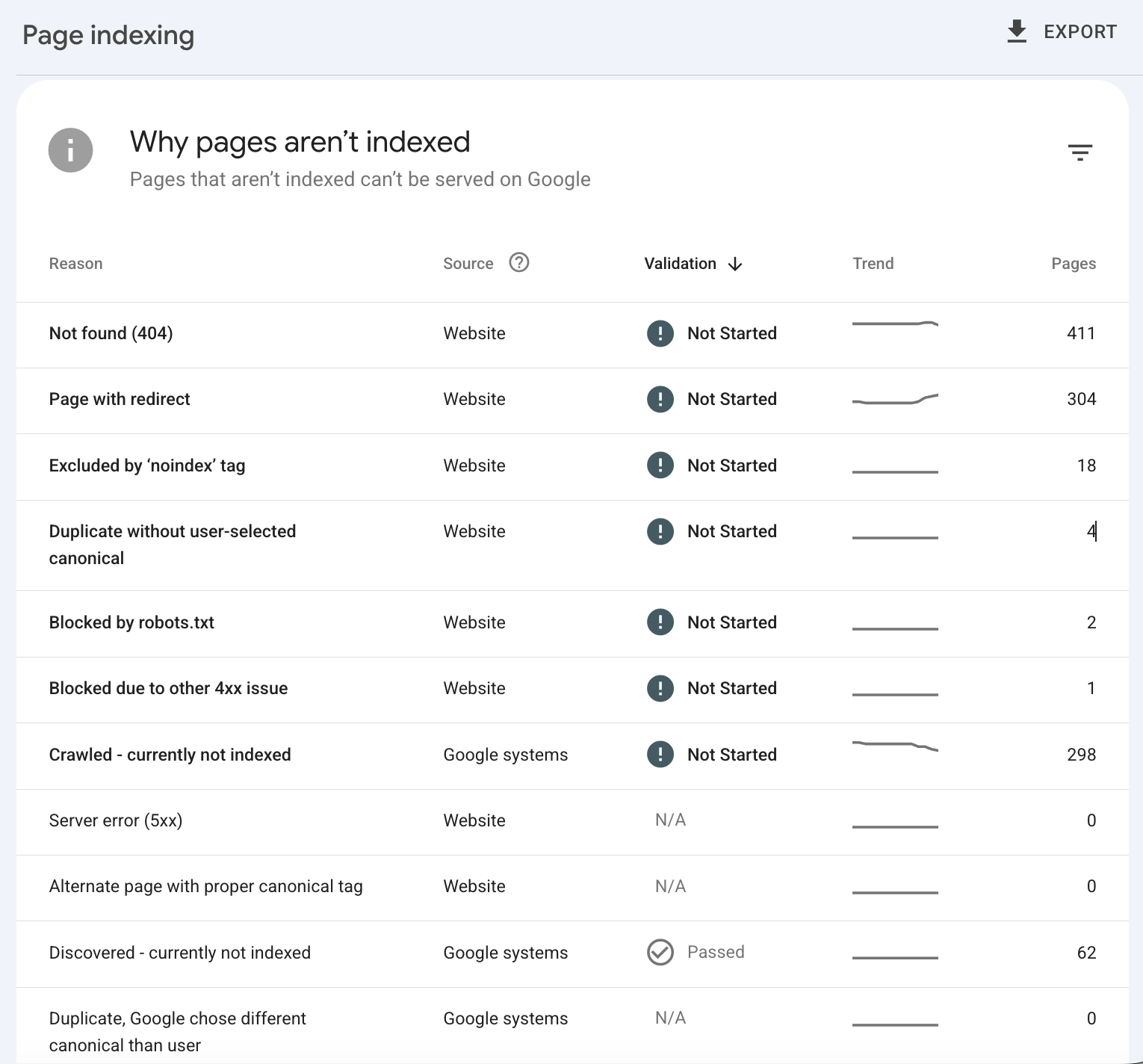
Statuses I check on every audit, in order of urgency:
- Discovered but not indexed: Google found the URL but decided not to store it. Common on thin city pages.
- Crawled but not indexed: Google fetched the URL and decided it was not worth indexing. Common on duplicate practice area subpages.
- Duplicate, submitted URL not selected as canonical: Google chose a different URL as the canonical for a cluster. Common on paginated blog archives.
- Excluded by noindex tag: Verify these are intentionally noindexed. Common accidental noindex on important pages during a redesign.
- Redirect: Verify the redirect chain is one hop. Chains longer than one hop waste crawl budget.
- Not found (404): Verify each 404 is genuinely gone. Return real 404s for gone content, 301s for moved content, 410s for permanently pruned content.
Index Bloat Patterns on Personal Injury Law Firm Websites
Index bloat is the presence of URLs in the index that dilute your firm’s PageRank without contributing to case acquisition. The Worth-to-Index ratio I use is straightforward. If a URL cannot answer a query or support a URL that does, it should not be indexed.
The bloat patterns below are the ones I see most often on personal injury firm sites, with a sample URL and the fix directive.
| Bloat pattern | Sample URL | Fix directive |
|---|---|---|
| Tag archive pages | /tag/car-accident/ | noindex plus remove internal links |
| Author archive pages | /author/john-attorney/ | noindex; consolidate to Attorney bio |
| Paginated blog archives past page 5 | /blog/page/17/ | noindex; canonicalize to /blog/ |
| Old case result posts with no content | /2014/settlement-example/ | 410 permanently; remove sitemap entry |
| Category duplicates of tag pages | /category/dog-bite/ and /tag/dog-bite/ | Pick one; noindex the other |
| Feed URLs | /feed/, /comments/feed/ | Disallow in robots.txt |
Most PI firms I audit are carrying 40 to 70 percent index bloat. Fixing it does not create new content or new backlinks, but it concentrates the PageRank you already have onto the URLs that actually drive signed cases.
There is a second, sitewide reason to prune. Google’s patent, Site Quality Score, US Patent 9,031,929 B1, from inventors April Lehman and Navneet Panda and granted in 2015, computes a site-wide quality ratio where the denominator grows with every indexed resource on the site. Every thin tag archive and boilerplate city page you keep indexed drags the ratio down without adding anything to the numerator. Culling low-value pages sometimes lifts a PI firm site’s quality score more than publishing new content does.
Discovered But Not Indexed on Personal Injury City Pages
Discovered but not indexed is Search Console’s polite way of saying Google decided your URL was not worth storing. On personal injury firm sites, this status shows up almost exclusively on thin city page templates.
Google’s patent, Predicting Site Quality, US Patent 9,767,157 B2, explains the mechanism: the system predicts a quality score for a site from features of the site itself, before any user interaction data accumulates. A templated, thin city page set starts at a low prediction floor, and pages below the floor do not earn indexation. That prediction is what Discovered but not indexed usually reflects on a personal injury firm site.
One of my clients, a five-office premises liability firm in California, came to me with 28 city pages, only 9 indexed. The 19 stuck in Discovered but not indexed shared 87 percent of their body content, differing only in the city name. Google’s canonical consolidation logic treats near-duplicate URLs as a cluster and typically picks one. The other 18 get demoted or excluded.
The fix is content differentiation, not more schema. Each city page needs unique local facts, unique attorney assignments to that city, unique case examples where permitted, and unique local landmarks or courthouses referenced.
Rendering and JavaScript SEO for Personal Injury Law Firm Sites
Rendering is the process by which the browser (or the crawler) parses your HTML, executes your JavaScript, and produces the final visible content. If Googlebot cannot render your firm site’s important content, that content does not enter the index.
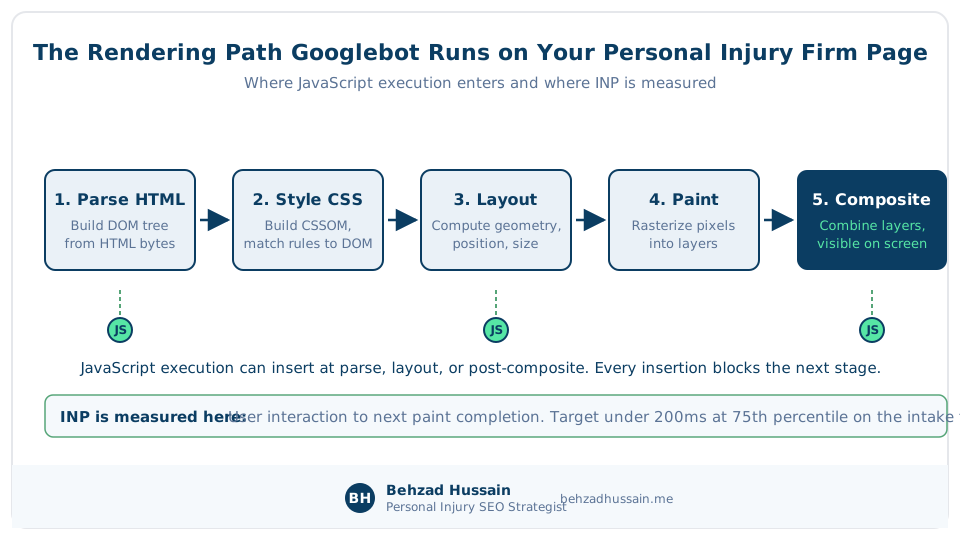
Google’s 2010 patent, Modifying Web Pages to Reduce Retrieval Latency, US Patent 8,977,653 B1, explicitly describes the rendering of web documents using a headless browser inside Google’s retrieval pipeline. The crawler is a browser. It executes JavaScript. But it does so under a resource budget, and a personal injury firm site that expects the crawler to execute 3 megabytes of client-side JavaScript to reveal the practice area page content is asking for indexation problems.

The diagram below traces the browser’s rendering path from HTML parse through paint and composite, with the JavaScript execution insertion points marked.
The Rendering Decision Tree for Personal Injury Law Firm Stacks
The decision I hand every firm considering a rebuild or a replatform is a decision tree between server side rendering (SSR), static site generation (SSG), and client side rendering (CSR). Google Search Central’s guidance on JavaScript SEO basics documents each pattern; the choice for a personal injury firm depends on the page template and update frequency. The decision tree below walks a firm from their current stack to a recommended rendering pattern based on page template and update cadence.
Practice area pages, city pages, and attorney bio pages benefit most from SSG or SSR. These pages change infrequently, need to rank for high-intent commercial queries, and cannot afford rendering-dependent indexation. Blog content works fine with SSG. Case result archives that update quarterly work with SSG plus incremental static regeneration. Live chat widgets and intake form submissions are the only surfaces that legitimately need CSR-style interactivity.
Server Side Rendering Configuration for Personal Injury Firm Sites
Server side rendering delivers a fully-formed HTML document from your server to the crawler and to the user’s browser. The crawler does not need to execute JavaScript to see your content. The user’s browser hydrates the page interactively after the initial HTML paint.
Google’s documentation is blunt about the pipeline behind all of this. The capture below is from the JavaScript SEO basics page, with the three phase sentence highlighted and Google’s own crawl, render, index diagram in frame.

The three configuration decisions I audit on SSR builds:
- Hydration strategy: full hydration blocks INP on all interactive elements; partial hydration (islands) preserves interactivity where it matters and skips it where it does not.
- Cache-Control headers on rendered pages: too permissive and users see stale content; too restrictive and your server thrashes.
- Fallback rendering path: if the SSR service fails, does your site serve stale cached HTML, or does it serve a broken page?
Get all three wrong and you inherit the problem the forum question below describes.
Core Web Vitals Targets for Personal Injury Law Firm Websites
Core Web Vitals are Google’s user experience metrics for measuring the real-world performance of your firm site. The three current metrics are Largest Contentful Paint (LCP), Interaction to Next Paint (INP), and Cumulative Layout Shift (CLS). Google’s page experience system uses them as ranking inputs.
The table below shows the Core Web Vitals threshold matrix, the Good, Needs Improvement, and Poor bands per metric, with context on which PI page template each threshold matters most for.
| Metric | Good | Needs Improvement | Poor | PI page template where this matters most |
|---|---|---|---|---|
| Largest Contentful Paint (LCP) | Under 2.5s | 2.5 to 4.0s | Over 4.0s | Homepage, practice area pages, city pages (hero image loads) |
| Interaction to Next Paint (INP) | Under 200ms | 200 to 500ms | Over 500ms | Intake form pages, chat widget surfaces, filterable case result pages |
| Cumulative Layout Shift (CLS) | Under 0.1 | 0.1 to 0.25 | Over 0.25 | Attorney bio pages (photo layout), homepage (hero video) |
web.dev’s specification for Largest Contentful Paint sets the target at 2.5 seconds or faster at the 75th percentile of real user data. web.dev’s specification for Interaction to Next Paint sets the threshold at 200 milliseconds or faster at the 75th percentile. web.dev’s specification for Cumulative Layout Shift sets the threshold at 0.1 or lower at the same percentile.

LCP Targets for Personal Injury Practice Area and City Pages
What is a good LCP for a personal injury law firm homepage on mobile? Under 2.5 seconds at the 75th percentile of real user data, measured through the Chrome UX Report, is the threshold Google’s page experience system rewards, and the practice area hero image is almost always the LCP element on a personal injury firm site.
The threshold is not my opinion. The capture below is from web.dev’s LCP specification, with the target value highlighted under Google’s own Good, Needs Improvement, and Poor scale.

The three levers I pull on LCP failing PI sites:
- Preload the hero image with a link rel preload in the head.
- Serve the hero image as WebP or AVIF with responsive srcset variants.
- Move the hero image below the LCP threshold priority queue if it is not the LCP element (some hero video autoplay configurations become the LCP surface unintentionally).
INP Diagnosis on Personal Injury Intake Form Widgets
INP measures the responsiveness of every interaction on your page. Click, tap, keystroke, form input. If the browser takes more than 200 milliseconds to respond to any interaction at the 75th percentile, your INP fails.
I had a Chicago firm lose an estimated 12 signed cases per month for six weeks after installing a new chat widget. The widget bumped intake form INP from 180ms to 640ms on mid-range Android devices. Organic traffic held. Form conversion dropped 22 percent. The fix was replacing the chat widget’s blocking script with a delayed-load pattern that fires only after the form’s first user input.
CLS Prevention on Personal Injury Attorney Bio Pages
Cumulative Layout Shift measures how much visible content moves during page load. On attorney bio pages, the CLS culprit is almost always the attorney photo loading without reserved space in the layout.
Three fixes that eliminate CLS on attorney bios:
- Set explicit width and height attributes on every attorney photo img tag.
- Reserve space for late-loading elements (video players, embedded reviews) with CSS aspect-ratio.
- Load web fonts with font-display swap and preload the primary body font.
Site Architecture and URL Structure for Personal Injury Law Firm Websites
Site architecture is the organizational structure of your firm site’s URLs and the internal link relationships between them. It determines how PageRank flows to your commercial pages and whether Google understands your firm’s topical hierarchy. The diagram below shows the practice area hub and city page silo model I recommend for personal injury firm sites, with cross-linking to attorney bios shown as dashed connectors.
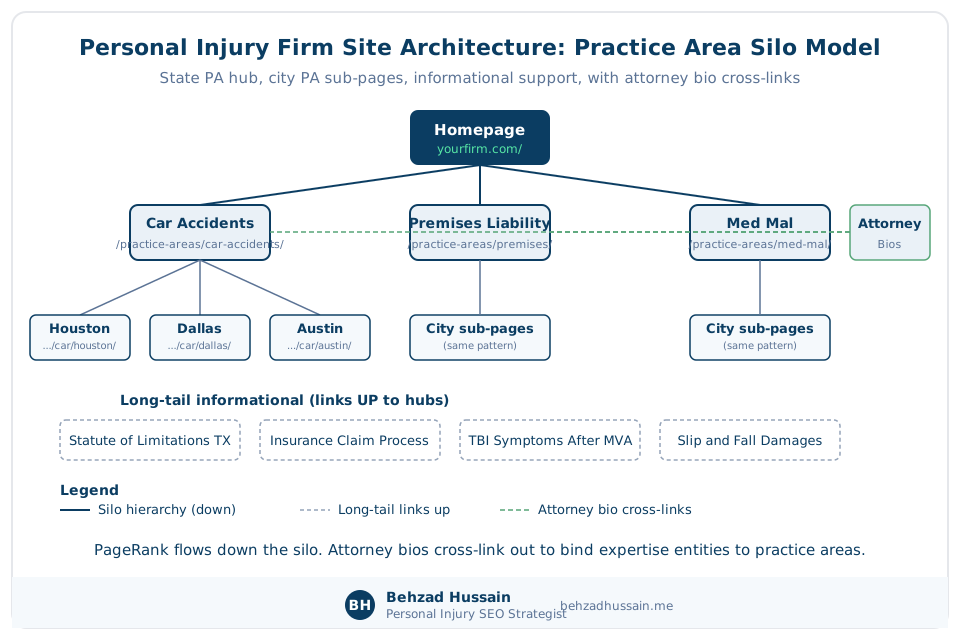
The Practice Area Hub and City Page Silo Model for Personal Injury Law Firm Websites
The silo model I use on personal injury firm sites has three tiers. The top tier is the state or practice area hub. The middle tier is the city practice area page. The bottom tier is the long-tail informational content that supports both. The visual below shows one car accident practice area hub distributing PageRank down to four Texas city sub-pages, with attorney bios cross-linking in from outside the silo.
Solid lines are the silo hierarchy carrying PageRank down. The dashed line is the attorney bio cross-link into the hub.
The practice area hub carries the highest PageRank because it links directly from the homepage. The city sub-pages inherit PageRank through the hub. The informational supporting pages (statute of limitations for a specific state, insurance claim process explainers, injury type explainers) link up to the practice area hub with descriptive anchor text.
Two patents govern how much each of those links is worth. The original PageRank patent, Method for Node Ranking in a Linked Database, US Patent 6,285,999 B1, filed by Lawrence Page and granted in 2001, defines authority as distributing iteratively through the link graph, which makes your internal links votes inside your own site’s graph. Google’s Reasonable Surfer patent, Ranking Documents Based on User Behavior and/or Feature Data, US Patent 7,716,225 B1, from inventors Jeffrey Dean, Corin Anderson, and Alexis Battle, then weights each link by the probability a user actually clicks it, using position, prominence, and surrounding context. A contextual link inside body copy on the practice area hub passes more value than the same anchor repeated in a sitewide footer.
Attorney bios sit outside the practice area silo because they serve multiple practice areas. Each attorney bio links out to the specific practice area hubs the attorney handles. This cross-linking pattern binds the attorney’s expertise entity to the practice area entity in the site’s internal link graph.
URL Structure Patterns for Personal Injury Practice Areas, Cities, and Attorney Bios
Google Search Central’s documentation on URL structure is the reference standard. The table below compares bad and good URL patterns for personal injury practice areas, city pages, attorney bios, and blog content.
| Page template | Bad URL pattern | Good URL pattern |
|---|---|---|
| Practice area hub | /page.php?id=42 | /practice-areas/car-accidents/ |
| City sub-page | /practice-areas/houston-car-accidents/ | /practice-areas/car-accidents/houston/ |
| Attorney bio | /team/attorney-42.php | /attorneys/john-smith/ |
| Blog post | /?p=1234 | /blog/statute-of-limitations-texas-car-accident/ |
| Case result | /results-detail?id=8 | /case-results/2-million-brain-injury-verdict/ |
Descriptive URLs help both users and search engines understand the page’s topic before they load it. Keep URLs short. Use hyphens as word separators in URLs (this is the one place hyphens are correct; URLs use hyphens per Google Search Central convention).
Breadcrumb Configuration on Personal Injury Firm Sites
Breadcrumbs help both users and search engines understand where a page sits in the site hierarchy. Schema.org’s BreadcrumbList type documentation is the vocabulary standard, and Google displays breadcrumb rich results in SERP for pages that mark them up correctly.
A city sub-page’s breadcrumb JSON-LD looks like this:
{
  "@context": "https://schema.org",
  "@type": "BreadcrumbList",
  "itemListElement": [
    { "@type": "ListItem", "position": 1, "name": "Home", "item": "https://yourfirm.com/" },
    { "@type": "ListItem", "position": 2, "name": "Practice Areas", "item": "https://yourfirm.com/practice-areas/" },
    { "@type": "ListItem", "position": 3, "name": "Car Accidents", "item": "https://yourfirm.com/practice-areas/car-accidents/" },
    { "@type": "ListItem", "position": 4, "name": "Houston Car Accident Lawyer", "item": "https://yourfirm.com/practice-areas/car-accidents/houston/" }
  ]
}
Structured Data for Personal Injury Law Firm Websites, with Attorney Advertising Rule Overlay
Structured data is the machine-readable annotation of your firm site’s entities and their relationships. Schema.org is the vocabulary. JSON-LD is the format Google prefers. Structured data binds your firm’s website to the personal injury attorney entity in Google’s knowledge graph, drives rich result eligibility, and materially improves AI Overview extractability.
Google’s 2020 patent application, A Transferable Neural Architecture for Structured Data Extraction from Web Documents, US Patent Application 2023/0014465 A1, describes how Google’s systems identify machine actionable structured data from raw HTML. The point of the patent is that structured data reduces the search system’s Cost of Retrieval for understanding your firm’s identity, credentials, service offerings, and location.
That patent grew out of published research. The KDD 2020 paper, FreeDOM: A Transferable Neural Architecture for Structured Information Extraction on Web Documents, by Lin, Sheng, Vo, and Tata, shows the extractor reads the DOM itself, node by node, and predicts a label for each one. The practical consequence for your firm site: clean semantic HTML with consistent template structure raises extraction accuracy even on pages where schema markup is missing.

In my 2026 SSRN paper, the Schema Completeness Index for Personal Injury Law Firm Websites, I audited 500 firms to measure how completely each site deployed the structured data types that Google explicitly documents for legal services. The distribution across the sample was heavily bottom-loaded: most firms deploy Organization or LocalBusiness schema, few deploy nested Attorney schema, and almost none deploy the full stack of sameAs binding, hasCredential, and alumniOf on attorney bios.
My 1,005 firm audit on ResearchGate, Schema Markup Adoption in Top-Ranking Personal Injury Law Firm Websites, found substantial state-by-state variation in schema deployment among firms already ranking on Google’s first page, which suggests structured data completeness is a differentiator that would move rankings if firms actually invested in it.
The matrix below shows which schema types belong on which page template on a personal injury firm site, with compliance flags where a schema type intersects an attorney advertising rule constraint.
| Page template | Recommended schema types | Compliance flag |
|---|---|---|
| Homepage | LegalService, LocalBusiness, Organization, WebSite | None |
| Practice area hub | LegalService, Service | None |
| City sub-page | LocalBusiness (per office), Service, LegalService | Check firm name compliance under Rule 7.5 |
| Attorney bio | Attorney (Person), sameAs, hasCredential, alumniOf | Verify honorificSuffix and specialty claims under Rule 7.1 and Rule 7.4 |
| Blog / guide | Article, Person (author), FAQPage (if applicable) | None |
| Case results | Article with disclaimer | Verify past result disclaimer under state bar rules |
| Testimonials or reviews page | Review, AggregateRating | HIGH RISK: Review schema exposes testimonials to SERP; many states restrict under Rule 7.1 without disclaimers |
| FAQ page | FAQPage | Verify no outcome guarantees implied in answers |
LegalService and LocalBusiness Schema Selection for Personal Injury Firms
Schema.org’s LegalService type documentation defines the properties available for marking up a law firm’s service offerings. LocalBusiness is broader; LegalService is the specialization. For a personal injury firm with a physical office, deploy both as nested types.
The vocabulary itself is jointly governed, which is why one correct deployment serves every engine. The 2016 Communications of the ACM paper, Schema.org: Evolution of Structured Data on the Web, by Guha, Brickley, and Macbeth, documents how Google, Microsoft, Yahoo, and Yandex all consume the same publisher-declared payload. Publish clean JSON-LD once and both Google’s and Bing’s entity graphs read it.
The base schema on the homepage looks like this:
{
  "@context": "https://schema.org",
  "@type": "LegalService",
  "@id": "https://yourfirm.com/#organization",
  "name": "Your Firm Name PLLC",
  "url": "https://yourfirm.com/",
  "telephone": "+1-555-555-0100",
  "address": {
    "@type": "PostalAddress",
    "streetAddress": "123 Main Street, Suite 400",
    "addressLocality": "Houston",
    "addressRegion": "TX",
    "postalCode": "77002",
    "addressCountry": "US"
  },
  "areaServed": [{ "@type": "State", "name": "Texas" }],
  "priceRange": "Contingency Fee",
  "sameAs": [
    "https://www.avvo.com/attorneys/yourfirm",
    "https://www.justia.com/lawyers/yourfirm"
  ]
}
Attorney and Person Schema on Personal Injury Attorney Bio Pages
One correction to the advice most schema guides hand out: Schema.org’s Attorney type is a subtype of LegalService, a business entity, not a person. For an individual lawyer’s bio page, the correct base type is Person, with worksFor pointing at the firm’s LegalService node. Deploy Person with the full authority stack: sameAs, hasCredential, alumniOf, worksFor, knowsAbout. The table below lists the Attorney schema properties I audit on every attorney bio, with the compliance note for each where state bar rules apply.
| Property | When to use | Compliance note |
|---|---|---|
| name | Always | Match to state bar record |
| jobTitle | Always | Match to firm role |
| worksFor | Always | Nested LegalService |
| sameAs | Always | Avvo, Justia, state bar profile, LinkedIn, Google Scholar |
| hasCredential | Always | Bar admission, board certifications |
| alumniOf | Always | Law school with EducationalOrganization type |
| knowsAbout | Always | Practice areas as text list |
| honorificSuffix | Optional | Verify against Rule 7.1 truthfulness (Esq. is universal; Certified Specialist only if genuinely bar-certified in that state) |
| award | Optional | Verify honesty; avoid puffery restricted under Rule 7.1 |
FAQPage and Article Schema on Personal Injury Guide Content
Schema.org’s FAQPage type is appropriate for pages that answer distinct questions with distinct answers. Article schema is appropriate for guide-style content like this page. Both improve extractability for AI Overviews and SERP featured snippets.
A minimal Article schema on this guide:
{
  "@context": "https://schema.org",
  "@type": "Article",
  "headline": "Technical SEO for Personal Injury Law Firm Websites: The 2026 Guide",
  "author": { "@type": "Person", "name": "Behzad Hussain", "url": "https://behzadhussain.me/about/" },
  "datePublished": "2026-07-26",
  "dateModified": "2026-08-08",
  "publisher": { "@type": "Person", "name": "Behzad Hussain" }
}
Review Schema Under State Bar Attorney Advertising Rules
Review schema is the markup most firms deploy expecting star ratings in Google’s SERP. The upside is smaller than most vendors admit: since September 2019, Google has ignored self-serving review markup, reviews of your own firm hosted on your own site, for rich result display. The compliance exposure, however, remains. On a personal injury firm site, this is where a technical implementation decision quietly becomes an attorney advertising rule question.
ABA Model Rule 7.1 governs the truthfulness of any lawyer communication about services, and ABA Model Rule 7.2 governs the specific requirements for lawyer advertising, including required disclaimers on certain advertising surfaces. In Bates v. State Bar of Arizona, 433 U.S. 350 (1977), the Supreme Court held that truthful attorney advertising is constitutionally protected commercial speech, which is the doctrinal foundation for every state bar’s Rule 7 series.

State bars interpret the rules differently. Some permit testimonial and review display with a disclaimer that past results do not guarantee future outcomes. Some effectively prohibit testimonials in any format. Some require specific disclaimer language on the same page where the testimonial appears.
The compliance overlay on Review schema, testimonial handling, and specialist claims is where I usually route firms to my Personal Injury Lawyer Marketing Compliance guide, because the schema decision cannot be made in isolation from the state bar rule that governs the surface.
Mobile First Indexing and the Personal Injury Intake Form INP
Google Search Central’s documentation on mobile first indexing is the standard reference: Google uses the mobile version of your firm site as the primary version for indexing and ranking. If your mobile site is worse than your desktop site (missing content, blocked resources, degraded schema), your firm loses.
The sentence that settles every mobile debate I have with firm developers sits in the first line of Google’s mobile first indexing page. I highlighted it below.

On personal injury firm sites, roughly 60 to 70 percent of search traffic is mobile. The intake form on mobile is where organic traffic becomes signed cases. That surface deserves specific technical attention. The mockup below shows the personal injury intake form specification I recommend for mobile, with tap target sizing annotations.
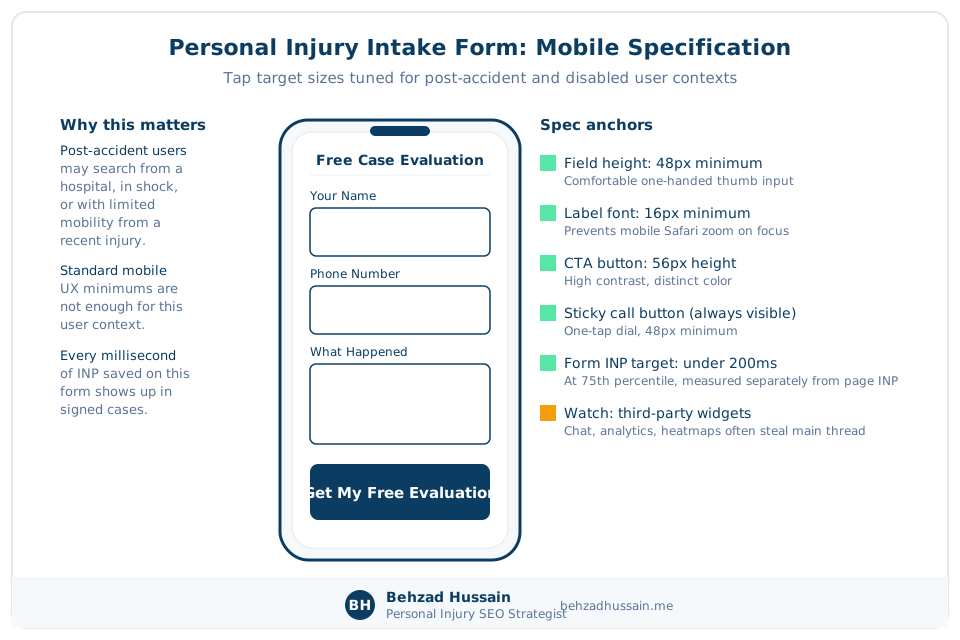
The Personal Injury Intake Form as the Highest Value INP Surface on the Site
Which page template is the highest INP failure risk on a personal injury law firm site? The intake form itself, because it carries the largest concentration of third-party JavaScript, form validation, and analytics event handlers of any surface on the site, and INP failure on the form directly caps conversion regardless of how well the rest of the site ranks.
I audit every intake form’s INP separately from the page’s overall INP. The pattern I see: page INP under 200ms, form INP over 400ms, form completion rate 15 to 25 percent lower than baseline. Third-party form widgets are almost always the culprit.
“On our first call, I tell every PI firm the intake form is the single highest ROI surface on the site for technical work, and every millisecond you shave off form INP shows up in signed cases,” I said to a firm in Florida last quarter.
Mobile CTA Tap Sizing for Post Accident Personal Injury Search Users
Mobile CTA buttons on a personal injury firm site need to accommodate users who may be searching from a hospital, from the scene of an accident, or with a physical disability from a recent injury. Standard mobile UX minimums are inadequate for the actual user context.
- Primary CTA (Call Us Now, Free Case Evaluation): minimum 48 pixel by 48 pixel tap target, ideally 56 pixel or larger.
- Sticky call button on mobile: floating, always visible, one-tap dial.
- Form field labels: 16 pixel minimum font size to prevent mobile Safari zoom.
- Form field height: 48 pixel minimum for one-handed thumb input.
- Submit button: distinct color, high contrast against background, minimum 56 pixel height.
One warning on the aggressive end of mobile conversion design. Google’s 2016 Search Central announcement, Helping Users Easily Access Content on Mobile, confirmed a demotion for intrusive interstitials that obscure the main content right after a user lands from search, and the rollout was confirmed in January 2017. Full-screen chat prompts, consultation-pitch modals, and lead-capture overlays that fire on entry are exactly that pattern. Use a small banner, a sticky call button, or an exit trigger instead. The demotion is avoidable and self-inflicted.
HTTPS, Security Headers, and Personal Injury Attorney Websites
HTTPS is a confirmed ranking signal. Google’s 2014 Search Central announcement, HTTPS as a Ranking Signal, established this. Every URL on your firm site must serve over HTTPS. Every internal link must use HTTPS. Every image, script, style resource must load over HTTPS to avoid mixed content warnings.

Beyond baseline HTTPS, the security header stack signals trustworthiness to browsers and adjacent scanners. The table below lists the HTTP security headers I audit on every personal injury firm site, with the recommended value for each.
| Header | Recommended value | Purpose |
|---|---|---|
| Strict-Transport-Security (HSTS) | max-age=31536000; includeSubDomains; preload | Forces HTTPS for one year, all subdomains |
| Content-Security-Policy | default-src ‘self’; scoped to third-party resources | Prevents injection attacks |
| X-Content-Type-Options | nosniff | Prevents MIME type confusion |
| X-Frame-Options | SAMEORIGIN or DENY | Prevents clickjacking |
| Referrer-Policy | strict-origin-when-cross-origin | Controls referrer data leakage |
| Permissions-Policy | Scoped per feature (geolocation, camera, mic disabled unless required) | Controls browser feature access |
HSTS is documented in RFC 6797 (Hodges, Jackson, and Barth, 2012). HTTP semantics generally are documented in RFC 9110 (Fielding, Nottingham, and Reschke, 2022).
Duplicate Content and Canonical Strategy for Personal Injury City Pages
Duplicate content on personal injury firm sites is almost always a city page template problem. Multi-office firms generate near-identical pages for every city they cover, differing only in the city name and a few local references. Google’s ranker treats these as a cluster and consolidates ranking signal to one URL, demoting the others.
The detection mechanics go back two decades. Google’s patent, Detecting Duplicate and Near-Duplicate Files, US Patent 6,658,423 B1, from inventors William Pugh and Monika Henzinger, describes content fingerprinting and shingling: the page body is broken into overlapping word sequences, compared, and near-identical pages get grouped into an equivalence class where one version surfaces and the rest are folded away. A city page template with only the city name swapped is precisely the input this system was built to catch.
Google’s canonicalization guide ranks the consolidation signals by strength. The capture below shows the ranked list, with the framing sentence highlighted.

Google Search Central’s guidance, Consolidate Duplicate URLs with Canonicals, is the reference standard for how the canonical tag should be applied on duplicate URL clusters. The canonical tag tells Google which URL in a near-duplicate cluster is the definitive one. The decision tree below walks through the canonical choice for city page templates on multi-office personal injury firms.
City Page Template Differentiation for Multi Office Personal Injury Firms
The differentiation test I run on every multi-city PI firm’s city pages:
- Do the city pages share more than 80 percent of body content? If yes, they are duplicates from Google’s perspective.
- Does each city page have unique local content? Local courthouse, local hospital referral network, local road patterns for the practice area, local statute references, local attorney assignments.
- Does each city page have unique attorney-generated content? Attorney quotes about local case patterns, local case results specific to that city, local community involvement.
If the answer to the differentiation questions is no across your city page set, consolidate. Pick the top 5 to 10 cities that actually drive signed cases, invest in genuine local differentiation for those, and canonicalize the rest to the state practice area hub.
Move fast on this if your city pages are still thin, because the filter now acts before indexation. A companion Google patent, Near-Duplicate Document Detection for Web Crawling, US Patent 8,548,972 B1, applies the same detection at crawl time so the crawler does not waste resources fetching substantially identical content. Boilerplate city pages may never reach the index at all.
I had a Georgia PI firm with 42 city pages, 8 indexed, come to me convinced they needed more content. The fix was fewer city pages: consolidate 42 down to 7 well-differentiated cities, canonicalize the rest, publish 4,000 to 6,000 words of unique local content per surviving city page. Indexation went from 8 of 42 to 7 of 7, and rankings on the differentiated cities moved from page 3 to page 1 average within 90 days.
When to Canonicalize a Personal Injury City Page to a State Practice Area Hub
When should a personal injury law firm consolidate 30 city pages into a single state practice area hub? When the city pages differ by only the city name and share more than 80 percent of their body content, because at that point Google is treating them as a cluster anyway, and consolidating explicitly gives you PageRank concentration on the surviving pages.
Log File Analysis for Personal Injury Law Firm Sites
Log file analysis is the audit of your server’s raw request logs to see how Googlebot actually spends time on your firm site. Search Console’s crawl stats give you aggregate data; log files give you ground truth per URL.
The tools I use: Screaming Frog Log File Analyser for most audits, custom Python or SQL for larger sites. The exports I care about:
- Requests per URL folder segment (practice areas, city pages, attorney bios, blog, other)
- Status code distribution per folder (200, 304, 404, 5xx)
- Response time per folder
- Crawl frequency per URL over time
The table below shows a sample log file breakdown from a mid-size personal injury firm site’s Googlebot activity over one week.
| URL folder | Requests per week | 200 responses | 304 responses | 404 responses | Avg response time |
|---|---|---|---|---|---|
| / (homepage) | 1,240 | 1,180 | 55 | 5 | 148ms |
| /practice-areas/ | 8,400 | 6,900 | 1,470 | 30 | 220ms |
| /attorneys/ | 3,200 | 2,900 | 280 | 20 | 195ms |
| /blog/ | 6,800 | 5,100 | 1,650 | 50 | 320ms |
| /tag/ (attorney tag archives, wasted) | 4,900 | 4,700 | 190 | 10 | 180ms |
| /author/ (wasted) | 1,800 | 1,750 | 40 | 10 | 175ms |
| /?filter= (wasted) | 5,600 | 3,200 | 100 | 2,300 | 890ms |
On this site, 12,300 of 32,940 weekly Googlebot requests (37 percent) hit URLs that add zero to case acquisition. That is the crawl budget waste patterns from earlier, quantified. Fix them and Googlebot spends that 37 percent of its attention on your practice area, city, and attorney pages instead.
The response time column in that table is a crawl budget lever most firms never look at. Google’s patent, Limiting Requests by Web Crawlers to a Web Host, US Patent 7,774,782 B1, describes capping the rate of crawler requests to a host based on the load the host can bear. A slow or error-prone server signals lower capacity, and the crawler backs off. Server performance investment is crawl budget investment.
I had a firm’s log file audit show 68 percent of Googlebot’s attention was going to a filter parameter combination on the case results page (case type times injury type times city times year). Every combination was a distinct URL to Google, and none of them were canonical or blocked. We killed the filter URLs at the robots.txt layer and consolidated the case results into a single filterable page with client-side filtering (which the crawler sees as one URL). Practice area page indexation quality lifted within four weeks.
Hreflang and Bilingual Personal Injury Law Firm Sites
Firms serving Spanish-speaking clients in Texas, Florida, California, or Arizona often publish Spanish language content parallel to their English site. Hreflang is the technical signal that tells Google which language version to serve to which user, and which English page is the equivalent of which Spanish page.
Google Search Central’s guidance on internationalization is the standard reference. The hreflang implementation for a Texas PI firm serving English and US Spanish speakers on a car accident page:
<link rel="alternate" hreflang="en-US" href="https://yourfirm.com/practice-areas/car-accidents/houston/" />
<link rel="alternate" hreflang="es-US" href="https://yourfirm.com/es/areas-de-practica/accidentes-de-auto/houston/" />
<link rel="alternate" hreflang="x-default" href="https://yourfirm.com/practice-areas/car-accidents/houston/" />
Every language version links to every other language version and to itself. The x-default fallback tells Google which page to serve when the user’s language does not match any specific hreflang tag.
Three implementation notes I hand every bilingual firm:
- Translate the intake form, not just the practice area page. A Spanish-language page that funnels to an English-only form loses conversions and looks careless.
- Use the correct regional variant. es-US for US Spanish speakers, es-MX for Mexico-targeted content, es for language-only (no regional targeting). PI firms serving the US Spanish-speaking market almost always want es-US.
- Match the schema. If the English attorney bio has Attorney schema with knowsAbout in English, the Spanish equivalent needs Attorney schema with knowsAbout in Spanish.
E-E-A-T Technical Signals for Personal Injury Attorney Bio Pages
E-E-A-T stands for Experience, Expertise, Authoritativeness, and Trust. Google’s Quality Rater Guidelines document E-E-A-T as evaluation criteria for content quality, especially in YMYL categories, which includes legal content. Attorney bio pages are where E-E-A-T signal concentration matters most for a personal injury firm. The table below maps every E-E-A-T technical signal I check on an attorney bio page to the implementation method and the verification method.
| Signal | Implementation | Verification |
|---|---|---|
| Attorney identity binding | Attorney schema with sameAs to Avvo, Justia, state bar, LinkedIn | Rich Results Test |
| Bar admission | hasCredential with EducationalOccupationalCredential (bar admission year, jurisdiction) | Schema Markup Validator |
| Law school | alumniOf with EducationalOrganization | Schema Markup Validator |
| Practice areas | knowsAbout with practice area terms | Content match |
| Experience | Text content: years of practice, case types handled, trial experience | Human review |
| Awards and recognitions | award property or content mention with verifiable source | State bar or awarding body verification |
| Author byline on guide content | Person schema on author, sameAs to bio page | Rich Results Test |
sameAs Binding for Personal Injury Attorney Bio Authority
The sameAs property tells Google that this attorney entity is the same entity referenced by these other URLs. It is the single most important E-E-A-T signal you can add to an attorney bio.
A minimal sameAs block for an attorney:
{
  "@context": "https://schema.org",
  "@type": "Person",
  "name": "Jane Attorney",
  "jobTitle": "Personal Injury Attorney",
  "sameAs": [
    "https://www.avvo.com/attorneys/jane-attorney",
    "https://www.justia.com/lawyer/jane-attorney",
    "https://www.texasbar.com/find-lawyer/jane-attorney-1234567",
    "https://www.linkedin.com/in/jane-attorney"
  ]
}
Include the state bar profile URL, Avvo profile, Justia profile, LinkedIn, and any Wikipedia page. If the attorney has a Google Scholar profile, include that. If the attorney has published papers or has a personal website, include those. Every sameAs URL is an entity binding that reinforces Google’s confidence that your attorney is the entity you claim they are.
hasCredential and alumniOf on Personal Injury Attorney Schema
The hasCredential property marks bar admissions, board certifications, and specialty designations. The alumniOf property marks law schools and undergraduate institutions.
{
  "hasCredential": [
    {
      "@type": "EducationalOccupationalCredential",
      "credentialCategory": "State Bar Admission",
      "recognizedBy": { "@type": "Organization", "name": "State Bar of Texas" },
      "dateCreated": "2005"
    }
  ],
  "alumniOf": [
    {
      "@type": "EducationalOrganization",
      "name": "University of Texas School of Law",
      "url": "https://law.utexas.edu/"
    }
  ]
}
The Author Byline as an E-E-A-T Signal Concentrator on Personal Injury Guide Content
Guide-style content on a personal injury firm site benefits from an author byline that binds the content to a real, credentialed author. On this article, the byline sits below the intro and links to the About page, and the schema declares Person as the author with sameAs to the professional profile URLs.
“I told a firm on our last strategy call that if the byline on your practice area guides is ‘Firm Name Team’ or ‘Legal Editor,’ you are throwing away the strongest E-E-A-T signal you own,” I said last week.
Common Technical SEO Diagnostic Patterns Across Personal Injury Firms
After running Phase 1 diagnostics on dozens of personal injury firm sites, three failure modes account for the majority of Phase 1 problems I find. The pattern recognition matters because it lets you self-diagnose before you engage a specialist. The grid below shows the three most common technical SEO failure modes on personal injury firm sites, with a priority score for each based on typical signed case impact.
Crawl budget waste on tag, archive, and filter URLs
Symptom: Search Console shows 8,000 URLs discovered, 2,000 indexed, with a growing gap. Fix: robots.txt directives plus noindex.
HIGH PRIORITYDuplicate city page templates causing Discovered but not indexed
Symptom: Search Console shows most city URLs in Discovered but not indexed status. Fix: content differentiation on top 5 to 10 cities; canonicalize the rest.
HIGH PRIORITYJavaScript rendering failure on modern framework rebuilds
Symptom: organic traffic drop of 30 to 50 percent after a Next.js, Nuxt.js, or React rebuild. Fix: switch to SSR or SSG for practice area, city, and attorney bio templates.
HIGH PRIORITYThe Three Most Common Technical SEO Failure Modes on Personal Injury Law Firm Sites
Mode 1: Crawl budget waste on attorney tag archives, date archives, and filter parameter URLs. Symptom: Search Console shows 8,000 URLs discovered, 2,000 indexed, with a growing gap. Fix: robots.txt directives plus noindex on the tag and archive URLs. Priority: HIGH (fastest to fix, immediate crawl reallocation).
Mode 2: Duplicate city page templates causing Discovered but not indexed on most city pages. Symptom: Search Console shows most city URLs in Discovered but not indexed status. Fix: content differentiation on the top 5 to 10 cities; canonicalize the rest. Priority: HIGH (protects the highest commercial intent surface on the site).
Mode 3: JavaScript rendering failure on modern framework rebuilds. Symptom: organic traffic drop of 30 to 50 percent after a Next.js, Nuxt.js, or React rebuild. Fix: switch to SSR or SSG for practice area, city, and attorney bio templates. Priority: HIGH (rebuild trajectory reversal, but requires developer time).
I have seen Mode 1 on roughly 70 percent of the personal injury firm sites I audit. Mode 2 on roughly 60 percent of multi-office firms. Mode 3 on roughly 90 percent of firms that have replatformed to a modern JavaScript system in the past 18 months.
Prioritizing Personal Injury Technical SEO Fixes by Signed Case Impact
The table below maps common technical SEO fixes to a rough signed case impact estimate and an effort estimate, so you can prioritize.
| Technical fix | Signed case impact estimate | Effort estimate |
|---|---|---|
| Robots.txt clean-up for tag and archive URLs | +2 to +5 signed cases per month within 90 days | 2 to 4 hours |
| Noindex on identified index bloat patterns | +2 to +4 signed cases per month within 90 days | 4 to 8 hours |
| City page content differentiation for top 5 cities | +5 to +15 signed cases per month within 120 days | 40 to 80 hours |
| JavaScript rendering switch to SSR on practice area pages | +3 to +8 signed cases per month within 60 days | 40 to 120 hours (developer) |
| Intake form INP diagnosis and third-party widget replacement | +8 to +20 percent form conversion within 30 days | 8 to 24 hours |
| Attorney schema with sameAs binding across all attorney bios | +2 to +5 percent CTR on bio pages within 120 days | 4 to 16 hours |
Signed case impact estimates are ranges from my audit experience, not guarantees. Every firm’s baseline and market are different. Prioritize the fixes that are cheap-and-fast first, then the fixes with the highest impact ceiling.
Working with a Personal Injury Technical SEO Specialist vs a Generalist Legal Marketing Agency
Every generalist legal marketing agency will run PageSpeed Insights on your homepage and hand you a report. Almost none of them will pull your server logs, segment Googlebot’s crawl behavior by URL folder, or audit your Attorney schema against state bar restrictions. The Phase 1 diagnostic I built is the shortest path from where your firm is now to a prioritized roadmap that ties every technical fix to a signed case impact estimate.
The questions to ask a vendor before you sign a retainer:
- Can you name the three most common Search Console coverage statuses and what causes each on a PI firm site?
- What is INP, how do you measure it, and where does it fail most often on a PI firm intake form?
- Which Schema.org types belong on an attorney bio page, and how do state bar rules affect Review schema deployment?
- What is the difference between server side rendering, static site generation, and client side rendering, and which one fits a PI firm’s practice area page template?
- What log file audit tools do you use, and can you walk me through a sample readout from a PI firm site?
If the vendor cannot answer four of five without hedging, they are not a specialist for your Phase 1 work.
For firms that already have a marketing team and want senior technical direction on top rather than execution, my Fractional Personal Injury Search Strategist role is the fit. For firms that want a full engagement across all four PI Organic Authority Engine pillars, the growth system retainer is the path. For firms that want to start with a diagnostic on Phase 1 alone, the entry offer is where I start almost every engagement.
Frequently Asked Questions About Technical SEO for Personal Injury Law Firm Websites
Questions the body sections above do not already answer. Body-covered questions have front-loaded direct answers in their sections per the FAQ non-duplication rule.